Access Instructions
Who to contact for Access?
Access to AII dashboards are managed by the Digital Delivery team, specifically your Package BIM Lead. They are responsible for reviewing access requests and assigning apprioriate permissions based on the individual's role and project responsbilitiy on behalf of your package.
The process to request access can be found in AII's Incident Management Plan.
To request access, please either contact your designated Package BIM Lead or contact our general mailbox at ED-DigitalSystems@neom.com.
Direct Access via Link
- A direct link to the AII dashboards can be provided by THE LINE Digital Delivery Team.
- Click desired link, which will open the dashboard directly in your default web browser.
- Ensure you are logged in with you M365 account to access the content.
Access via PowerBI
To manually navigate to the dashboard:
- Open PowerBI in your browser.
- Log-in using M365 credentials.
- In the left-hand navigation pane, select Apps.
- Locate and open the relevant dashboard application (as shown in the reference image, if provided.)
Tip
If you frequently use the AII dashboards, consider bookmarking the direct link or pinning the app within your PowerBI workspace for quicker access!
Access & Permissions Management for AII Adminstrators
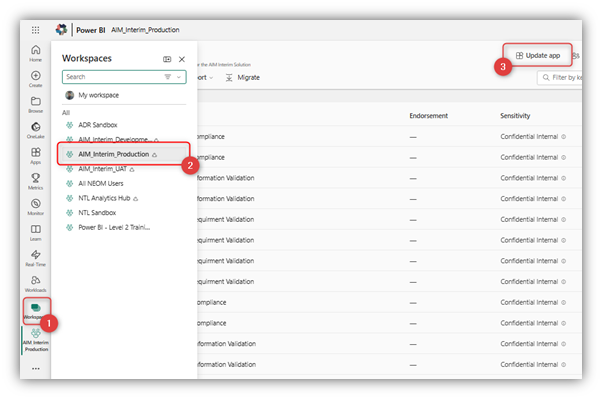
Fig. 1 - Access & Permissions Management for AII Adminstrator (Part 1 of 2)
- Navigate to PowerBI - Open PowerBI and log in to your M365 Account.
- Select Workspace - Click on the Workspace Tile at the bottom left corner of the feature panel.
- Select AII Workspace - Select the "AII Workspace".
- Update the App - Select the "Update App" at the top right corner.
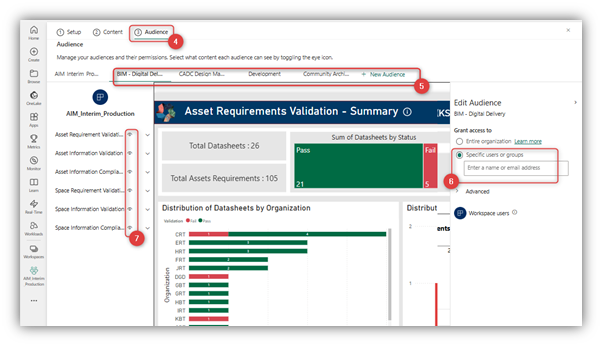
Fig. 2 - Access & Permissions Management for AII Adminstrator (Part 2 of 2)
- Select Audience - On the new screen, Select the "Audience" option.
- Manage Audience Groups - Select the desired "Audience Group" under the Audience section.
- Add Users to Audience Group - Using the panel on the right side to add users to the specific Audience Group.
- Control Dashboard Page Visibility - Toggle the dashboard page visibility for any Audience Group by selecting the
 .
.