Process Walkthrough
Introduction
AII extracts data from both BIM Models & Data Sheets submitted by the Design Consultants. All stakeholders are subsequently provided with a set of dashboards for viewing and verifying the information.
| Type | Role | Definition |
|---|---|---|
| Validation | BIM Manager; Design Consultant1 | Check if data is structured and following the required Data Quality Requirements and Expectations. |
| Compliance | Design Manager; Design Consultant1 | Check if data is compliant against a set of Design/Engineering Requirements and Expectations. |
Overview Process
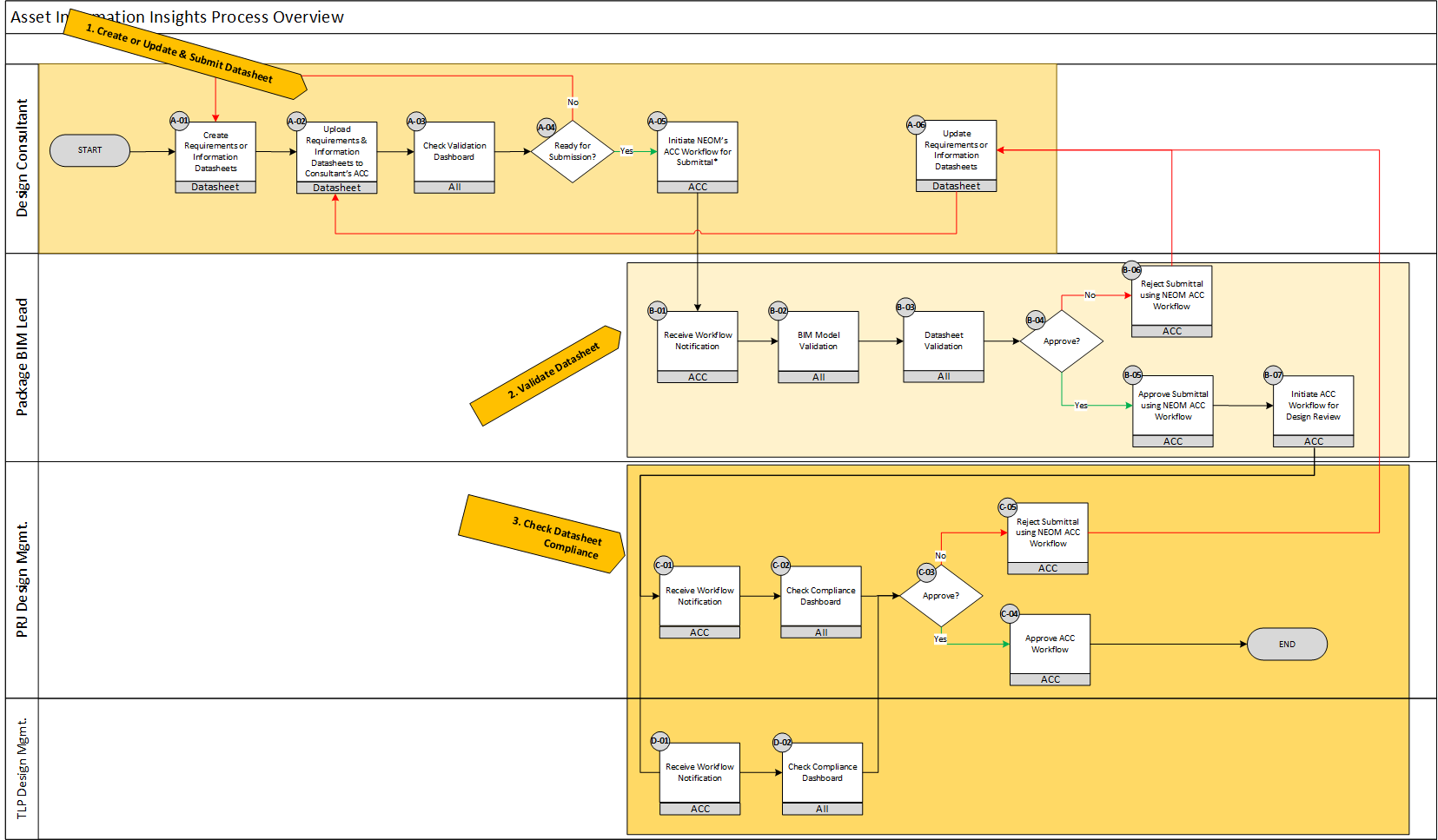
Fig. 1 - Requirements & Information Datasheets Process Overview
AII Core Audiences & Processes
- Consultant - Create / Update Asset & Space Requirements
- Consultant - Create / Update Asset & Space Information
- BIM Manager - Validate Submitted Asset & Space Requirements and Information
- Design Manager - Check Compliance of Submitted Asset & Space Information against their corresponding Requirements.
Detailed Process
Creation & Submission of Requirements and Information Datasheets
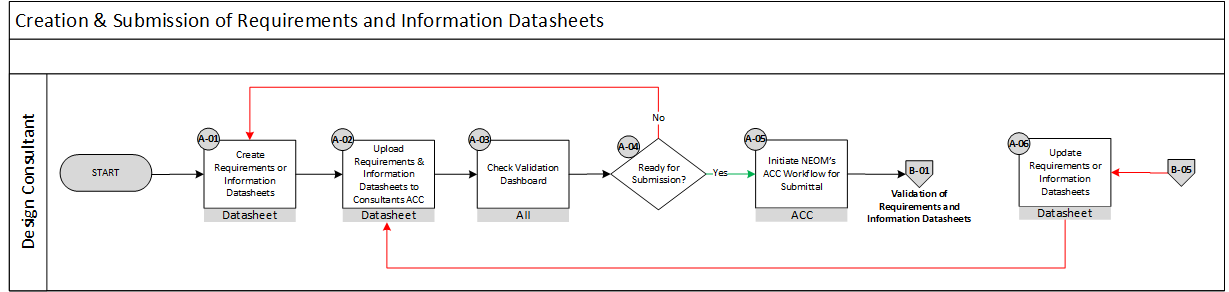
Fig. 2 - Creation & Submission of Requirements & Information Datasheets
The following table below breaks down each process step of the Creation & Submission of Requirements and Information Datasheets expected by the Design Consultant to perform.
| Process ID | Description | Input | Output | Design Consultant | Package BIM Lead | Digital Operations Lead | Design Manager |
|---|---|---|---|---|---|---|---|
| A-01 | Create Requirements or Information Datasheets | Design Data | Requirements or Information Datasheets | R|A | |||
| A-02 | Upload Requirements & Information Datasheets to Consultant’s ACC | Requirements or Information Datasheets | Datasheets Available in NEOM ACC | R|A | |||
| A-03 | Check Validation Dashboard | Validation Results Represented on an AII Dashboard | Validation Review Summary | R|A | |||
| A-04 | Ready for Submission? | Validation Review Summary | Step A-05 or A-01 | R|A | |||
| A-05 | Initiate NEOM’s ACC Workflow for Submittal | Datasheets Available in NEOM ACC | ACC Workflow Notification | R|A | I | I | |
| A-06 | Update Requirements or Information Datasheets | Rejection of ACC workflow | Upload Requirements & Information Datasheets to Consultants ACC | R|A | C | I |
Validation of Requirements and Information Datasheets
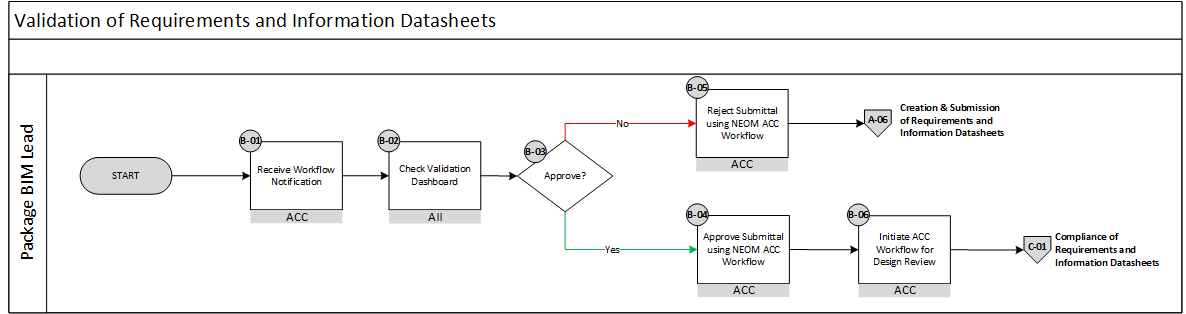
Fig.3 - Validation of Requirements and Information Datasheets
The following table below breaks down each process step of the Validation of Requirements and Information Datasheets expected by the Package BIM Lead to perform.
| Process ID | Description | Input | Output | Design Consultant | Package BIM Lead | Digital Operations Lead | Design Manager |
|---|---|---|---|---|---|---|---|
| B-01 | Receive Workflow Notification | ACC Workflow Notification | Validation Results Represented on an AII Dashboard | I | |||
| B-02 | Check Validation Dashboard | Validation Results Represented on an AII Dashboard | Validation Review Summary | R | A | ||
| B-03 | Approve | Validation Review Summary | Approval or Rejection of ACC workflow | R | A | ||
| B-04 | Approve Submittal using NEOM ACC Workflow | Validation Review Summary | Approval of ACC workflow | I | A | A | |
| B-05 | Reject Submittal using NEOM ACC Workflow | Validation Review Summary | Update Requirements or Information Datasheets | I | R | A | |
| B-07 | Initiate ACC Workflow for Design Review | Approval of ACC workflow | Requirements or Information Datasheets ready for Compliance Check | I | R | A |
Compliance of Requirements and Information Datasheets
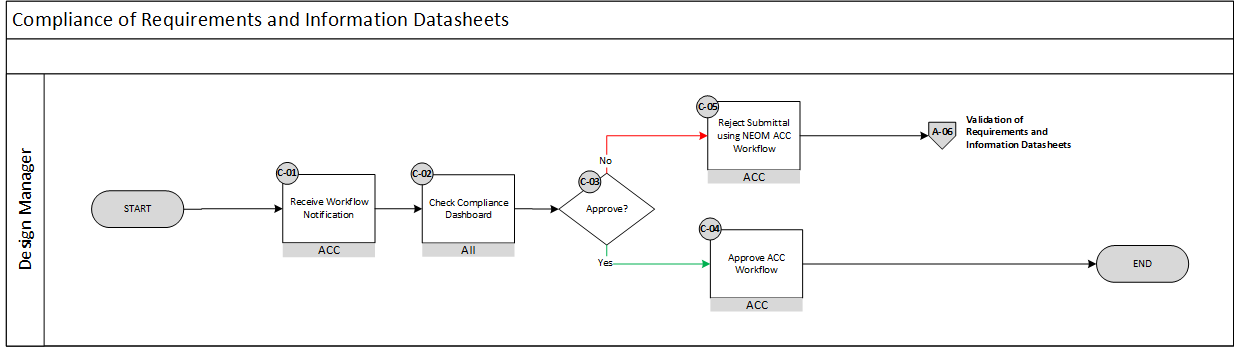
Fig. 4 - Compliance of Requirements and Information Datasheets
The following table below breaks down each process step of the Compliance of Requirements and Information Datasheets expected by the Design Manager to perform.
| Process ID | Description | Input | Output | Design Consultant | Package BIM Lead | Digital Operations Lead | Design Manager |
|---|---|---|---|---|---|---|---|
| C-01 | Receive Workflow Notification | ACC Workflow Notification | Compliance Results Represented on an AII Dashboard | I | I | R|A | |
| C-02 | Check Compliance Dashboard | Compliance Results Represented on an AII Dashboard | Validation2 & Compliance Review Summary | R|A | |||
| C-03 | Approval | Validation & Compliance Review Summary | Approval or Rejection of NEOM ACC workflow | I | I | R|A | |
| C-04 | Approve ACC Workflow | Approval or Rejection of submission | Submitted Requirements & Information moved to Final folder | I | I | R|A | |
| C-05 | Reject Submittal using NEOM ACC Workflow | Validation Review Summary | Update Requirements or Information Datasheets (B-06) | I | I | R|A |